
- Buy Crypto
- Markets
- Futures
- Spot
- Copy Trade
 WE-Launch
WEEX Crypto Gift: The Perfect Gift for Every Crypto Lover in 2025

WEEX is excited to introduce the Crypto Gift feature, bringing the fun of “grabbing red packets” to the crypto world. Now, you can easily send assets to friends as gifts in just seconds—whether for New Year wishes, celebrations, or spontaneous raffles. With Crypto Gift, simply select between Standard or Random options, set the amount, portions, and claim rules, then share via link or QR code. The best part? No fees, no hassle—just instant transfers. Let Crypto Gift be your bridge to surprise, joy, and shared fortune with those who matter most.
This guide covers what Crypto Gift is, its key highlights, how to use it, and common FAQs.
What is Crypto Gift?
Crypto Gift allows users to create and send multi-claim “crypto red packets” using USDT or WXT. The sender can configure the Crypto Gift type, total amount, number of portions, basic parameters, personalized settings, and advanced settings, then share via link or QR code. When a red packet is claimed, the corresponding amount is instantly credited to the recipient’s account. Any unclaimed amount after expiry is automatically returned to the sender’s account.
Highlights of Crypto Gift
1.Two allocation modes for different experiences
- Standard Crypto Gift: The total amount is evenly divided by the number of portions—simple and fair.
- Random Crypto Gift: The system allocates the amount of each portion randomly, more intriguing and engaging.
2.USDT and WXT are now supported.
3.Advanced settings include claim conditions, such as only new users can claim, or only users who registered via a specific invite link can claim.
4.Easy sharing, wide reach: One-tap copy to share links on social or communities; also supports claiming via QR codes.
5.Instant settlement, smooth experience: Once claimed, funds are automatically credited to the recipient’s account with no waiting.
How to send and claim a Crypto Gift
Web
1.Sending tutorial
I. While logged in, click “Gift” in the profile menu. You can also go directly via: https://www.weex.com/en/redpacket
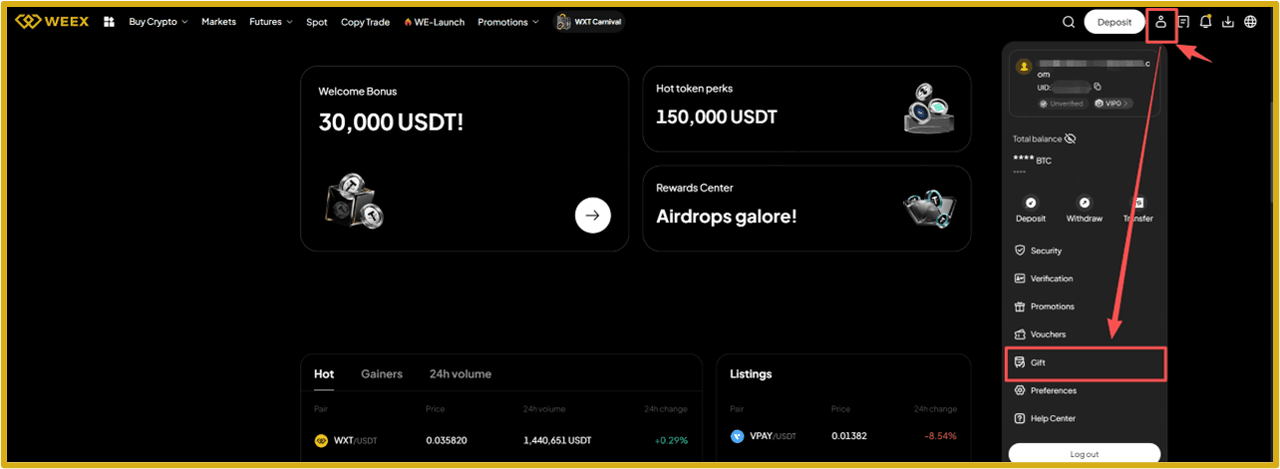
II.Select the “Send” tab and click “Create now” to open the Crypto Gift creation page.

III. Then you can set the Crypto Gift type, basic parameters, personalization settings, and advanced settings. Click "Create Now" at the bottom to finish creation.
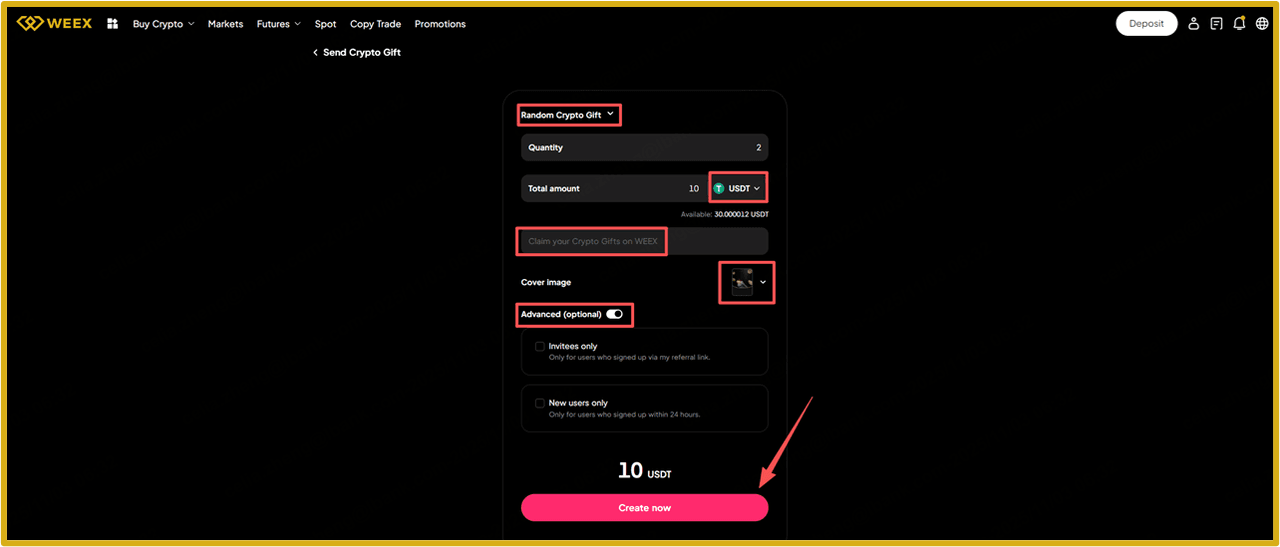
IV. Now your Crypto Gift is created successfully. Share it with friends via a QR code or link.

2.Claiming tutorial
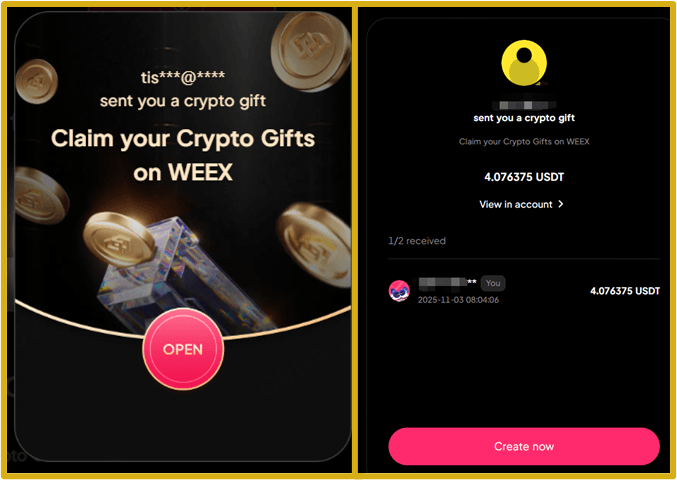
I. On the Crypto Gift page, enter the Crypto Gift Code and tap “Claim”.

II.As shown below, once claimed successfully, funds are automatically credited to your account.
App
1.Sending tutorial
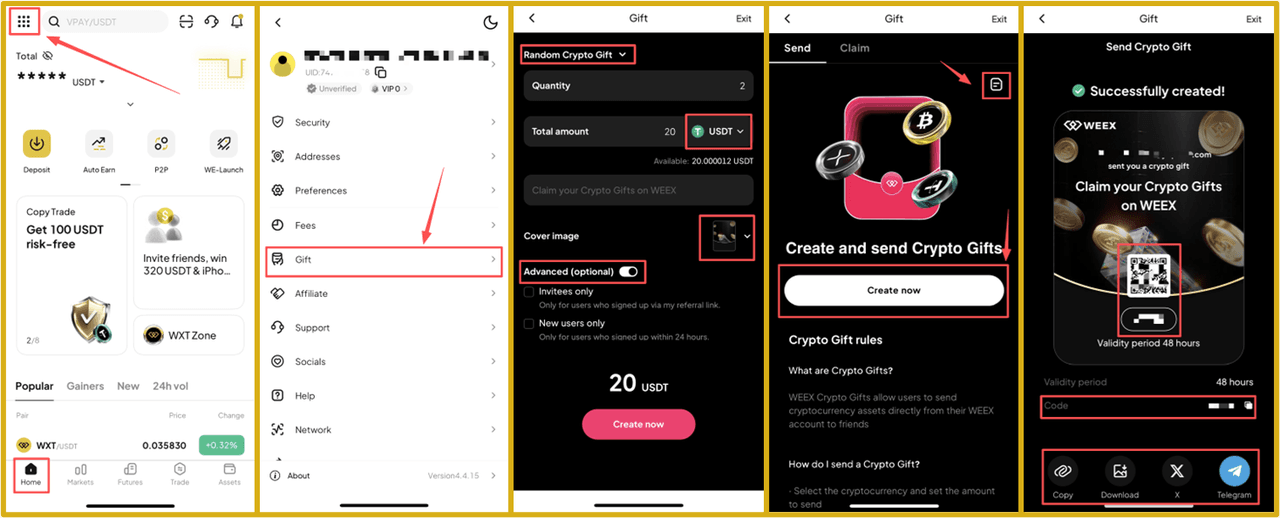
I. While logged in, go to Homepage and tap the top-right icon to enter the profile menu.
II. In the profile menu, tap “Gift” to open the Crypto Gift page.
III. Select the “Send” tab and click “Create now” to open the Crypto Gift creation page. Tap the top-right icon to view your Crypto Gift history.
IV. Then you can set the Crypto Gift type, basic parameters, personalization settings, and advanced settings. Click "Create Now" at the bottom to finish creation.
V. Now your Crypto Gift has been created successfully. Share via a QR code or link with your friends.
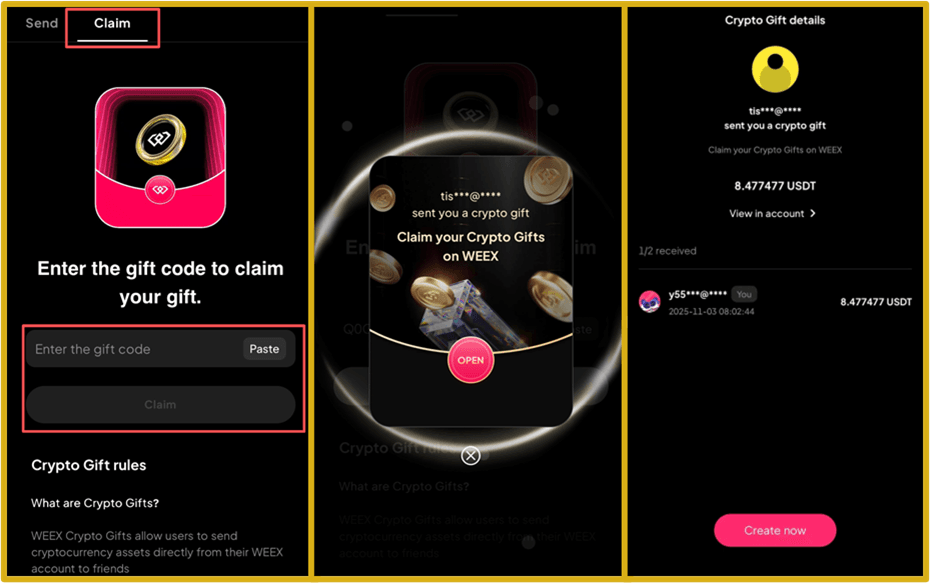
2.Claiming tutorial
I. On the Crypto Gift page, enter the Crypto Gift Code and tap “Claim” to receive.
II. As shown below, once claimed successfully, funds are automatically credited to your account.
FAQ
1.What does it mean when funds are "frozen" while sending a gift? Does it affect my trading?
The gifted amount is temporarily frozen to ensure that the Crypto Gift is valid. Once the gift is sent, the corresponding funds are deducted from your available balance and locked. These frozen funds cannot be used for trading or other operations until the gift is fully claimed. If the gift expires or is not fully claimed, the remaining funds will be unlocked and returned to your available balance.
2.Can I cancel a Crypto Gift after sending it?
Unfortunately, a Crypto Gift cannot be recalled once it's created and shared. You can wait for 24 hours before the unclaimed asset is returned to your account.
3.Why can't I claim a Crypto Gift after scanning the QR code?
There may be several reasons:
i. Crypto Gift fully claimed: All funds in the gift have already been claimed.
ii. Already claimed: Each user can only claim once per gift.
iii. Not eligible: The sender may have restricted the gift to "new users only" or "invited friends only."
iv. Expired: The 24-hour validity period has passed.
v. Network or app issue: Check your internet connection or try restarting the app.
4.Where can I view the funds I've claimed?
Once claimed, the funds are instantly credited to your account. You can view the balance changes under "Assets" → "Spot Account" for the received crypto asset.
5.Are there any restrictions on sending or claiming Crypto Gifts?
The platform has set limits on the maximum crypto amount per gift and the number of gifts a user can send per day to ensure fund security. Refer to the instructions on the page for the exact limits.
6.Where do the funds go when a Crypto Gift is returned? Where can I find it?
Expired or unclaimed funds are unfrozen and returned to your "Spot Account." Check your "Spot Account" instead of your "Funding Account."
7.What if my gift link or code is leaked?
Crypto Gifts are non-targeted by default. We recommend using the advanced settings to restrict claim eligibility for future gifts (such as invited friends only). For sent gifts, you'll need to wait for the 24-hour validity period to end. Any unclaimed funds will then be automatically returned to your account.
Related Reads


 App
App